New ways to organize and play
First and foremost, we now have 300 members in the Overseer Studio Discord! If you're not familiar with our Discord, it's a growing community of GMs and players who are welcome to showoff their current setup and exchange ideas or tips for using Overseer Studio. There's lots to see and I often post sneak peaks of what I'm working on -- join us using the link above!
The most impressive part of building Overseer has been the sheer creativity of the community. For example, a user had asked if there was a way to create "sections" on your screen to easily switch between areas of interest. I had never considered this before and was eager to file a feature request but before I could, another user mentioned they use Placeholder tiles to wrap sections on their canvas so that they can shortcut different areas easily.
That's genius.
I absolutely love seeing GMs (and players) use Overseer in creative ways like this. I often like to think of Overseer as a Core Ruleset for a TTRPG. The Core Ruleset lays the foundation for playing a TTRPG, but you are free to use these rules in whichever way you see fit -- it's a game, after all! Have fun!
Seeing how GMs were using Overseer inspired me to finish up some long-standing features that I've had on the back-burner for a couple of months now. Features that make creating, organizing, and playing using your digital GM screen even faster and easier.
Without delay, let's dive right in!
Simpler, streamlined interface
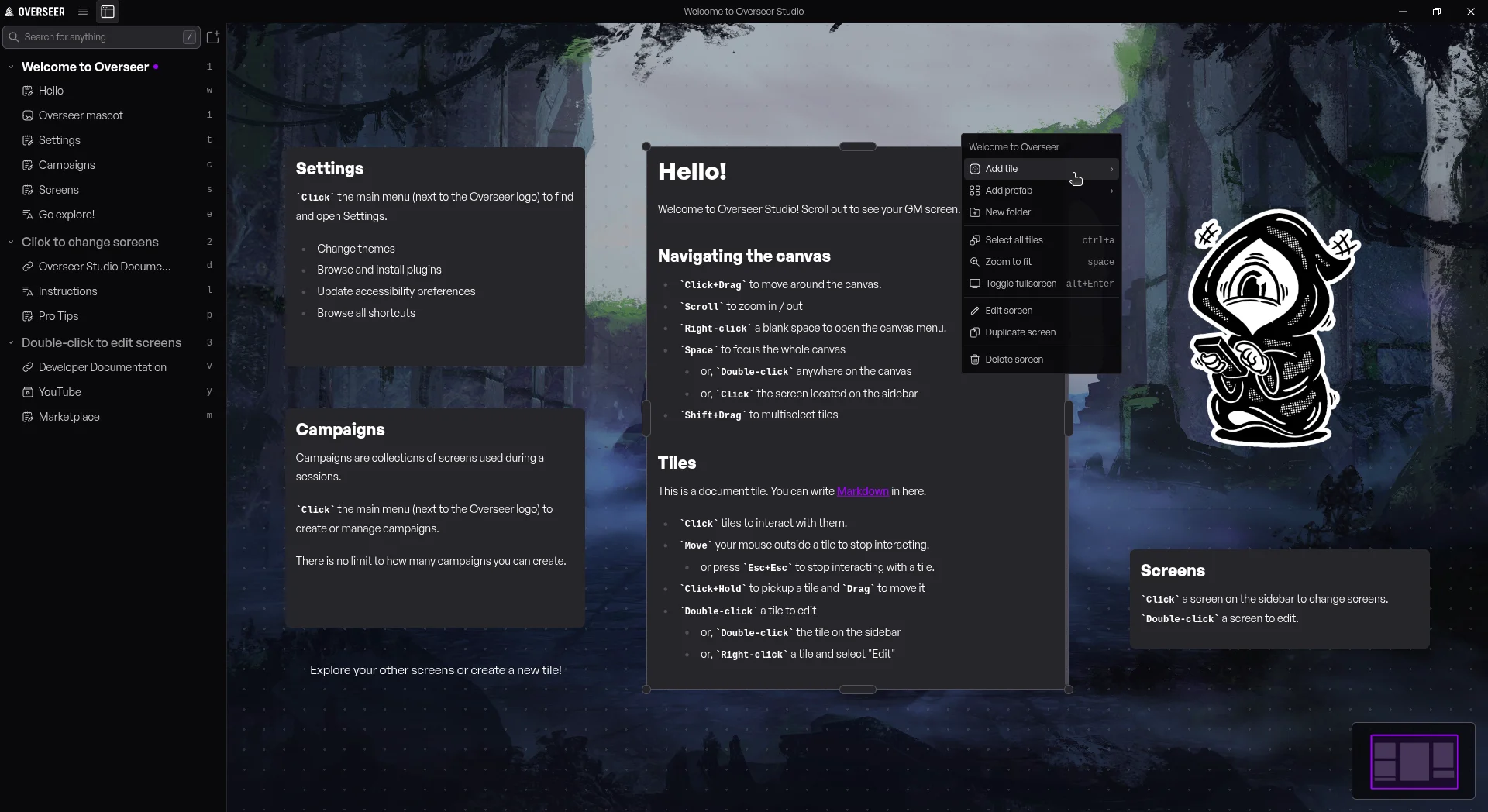
I'm starting a new campaign and have been using Obsidian Notes to start writing the outline. One of the things I love about Obsidian is just how minimal the interface is. You see, I'm not a user interface designer -- not by any stretch of the imagination. I just know when I see something I like, I can articulate why I like that thing. I then turned my attention to applications like Discord, Linear, and Notion to study their interfaces.
All the apps listed above do something very clever with their interfaces. There are no big logos, buttons are placed pleasantly inside the title bar, and they keep the user focused on the content.

I wanted to try something similar for Overseer and was delightfully surprised when I was able to condense the main sidebar, opening up more screen real estate for the actual digital GM screen.
In addition to a slightly better sidebar, all context menus have been reorganized to highlight a GM's most taken actions first. All menus can also be navigated with keyboard shortcuts as well.
I've been adding small bits of flair across the application, whether that's a "pop" animation when creating a new tile, a swipe animation when navigating menus, or simply showing the current shortcut for a button when hovering. It's these little bits of polish I really enjoy that make Overseer feel like a solid tool.
If you have any suggestions or comments about the interface, let me know in Discord!
Zones

Zones are a new type of tile that take on a unique set of traits. Remember the Placeholder tile trick mentioned above? Zones are the real solution to this problem.
Zones allow you to create "areas of interest" on your digital GM screen. A zone wraps any number of tiles and sits firmly in the background as to not disrupt your flow. Zones can be moved by dragging the label, resized like any other tile, and can be colored coordinated. Most importantly, you can add shortcuts to Zones to quickly navigate between areas of interest on your canvas.
To create a Zone, simply highlight any number of tiles (Shift+Drag), right-click, and select Create zone from selection.
Minimap

This feature was inspired by my lovely wife, Kim, whom I'm slowly turning into a TTRPG enthusiast. I'm a big believer in The Mom Test and so I challenged Kim to build a simple GM screen for a one-shot campaign and let me know what she liked and disliked about using Overseer.
Truthfully, I wasn't expecting a minimap to be something she sorely missed; however, minimaps are pretty easy to build and after chatting with the community in Discord, I decided this was the perfect time to implement this feature.
Minimaps can be turned on or off in Settings > Session > Minimap. The minimap can be configured to be Large, Medium, or Small and can be placed in any of the screen corners. You can interact with the minimap to instantly pan to different areas of your canvas.
I'm personally a big fan of this new feature and it's helped me visualize my screens at a very high level. I'm eager for you to try this out!
Folders

I'll admit, I wasn't looking to build complex software and folders were always one of those features that teetered on the edge of being complex. But, after playing around with folders for awhile, I've come to terms that they are an incredibly powerful solution at hiding complexity within your digital GM screen.
Folders can be created, colored, and labeled. You can even add shortcuts to a folder to quickly focus all the contents of a folder at once.
Folders cannot be nested, yet. This is a purposeful design decision to keep complexity to a minimum but I'm open to feedback if you feel differently.
To create a folder, highlight any number of tiles (Shift+Drag ) then right-click and choose Folder > New folder.
Webcam tile
I want to thank ThatBritishMo for this awesome feature idea! You really should go follow him on YouTube - I'll wait. Go now, we'll pick up when you get back.
Mo is one of the nicest people I've had the pleasure of chatting with in recent years. Humble and hardworking and just an overall positive force. You see, Mo had issues with the performance of Overseer a few months ago and left a one star review. No hard feelings! I actually love when people are brutally honest with their review because it typically means they really want to like the application, but something is preventing them from doing so and it's my job to figure out what that something is.
After fixing the performance issues, I had the chance to have a video call with Mo that lasted over an hour. We chatted about Daggerheart, TTRPGs, YouTube and so much more. One request that came up was the ability to create Webcam tiles so that he could stream his IRL battlemaps within Overseer.
Brilliant.
Turns out this was fairly easy to do and so I'm extremely happy to announce that you can now create Webcam tiles directly within Overseer. Use this to stream your IRL battlemaps or as an alternative scene builder for OBS. Sky is the limit.
What's next?
If there is any common theme across all these new features, it's this: speak up! I would love to hear from you in Discord or simply send me an email at tom@overseer.studio.
I really want to know what you think of Overseer, whether that's good or bad. All feedback is good feedback and it sincerely helps me make Overseer better for everyone. I've stated this in a few places online but it's worth highlighting here again: I want Overseer to be the easiest way to pickup new TTRPGs. I think too often we focus on digital enhancements to our TTRPGs that we sometimes lose sight of what's important -- the Game Master. Without the Game Master, we wouldn't be able to roleplay amazing adventures with our friends, or fight impossible bosses to defend our world from evil. We need Game Masters to feel empowered when running amazing adventures and that's what I want Overseer to ultimately bring to the table. Empower the GM, make memories with friends.
So what's next? Drawing tools are being researched, portal tiles have been in the works for awhile, and anything else you and the community can think of. Let me know!
✨ Features
Brand new user interface - The interface has been consolidated to improve screen real estate and organization
Reorganized all context menus to reduce vertical real estate and noise, most common actions are prevalent and easily accessible
Added keyboard navigation to all context menus
Added new global shortcuts and labels, see Settings > Shortcuts for all available shortcuts
Folders - Organize your tiles into folders to reduce vertical space on the session sidebar, configure label and color
Zones - Create areas of interest on your canvas and add shortcuts to quickly navigate to sections of your canvas
Webcam tile - Create a tile of a live webcam connected to your machine, useful for IRL battlemaps or an alternative OBS input source
Minimap - Quickly scan the contents of your entire canvas and navigate using a minimap, configure position and size
All assets in the application react to outside changes - this means all PDF, image, video, audio, and other files will instantly reload if an outside change is detected
This is useful for Obsidian PDF exports or loading maps from external graphics programs
🔧 Enhancements
Added Send to front / Send to back options to tile right-click menu
Removed delay when clicking a tile to focus or dragging a tile to move
Creating a tile opens the edit drawer immediately, auto focuses the label field to rename the tile
New tiles animate a satisfying "pop" effect when created
"Pop" animations when dragging and dropping are now less aggressive
🚀 Performance
Upgraded to Electron 43.4.1, improving performance and stability
🐛 Bugfixes
Fixed an issue where Windows update files were not properly code signed, this could have resulted in a "Safe App" screen blocking updates
Fixed an issue where a license could be invalidated after waking a machine
Fixed an issue where locking pan or zoom on a canvas would not actually work
Fixed an issue where the pop out window could render blank on certain machines
Fixed an issue where loading assets of the same file name could result in stale data
Fixed an issue where translations would not load from plugins